Practical Architecture Guide · 2026

AI Coding ยุคต่อไปไม่ใช่
Prompt Engineering
แต่คือ Context Engineering

วิธีออกแบบ Memory Vault / LLM Wiki ให้ Claude Code, Codex และ AI Agent ดึงความรู้โปรเจกต์กลับมาใช้ซ้ำได้อย่างเป็นระบบ

Context Engineering AI Coding Agent Memory Vault 2026
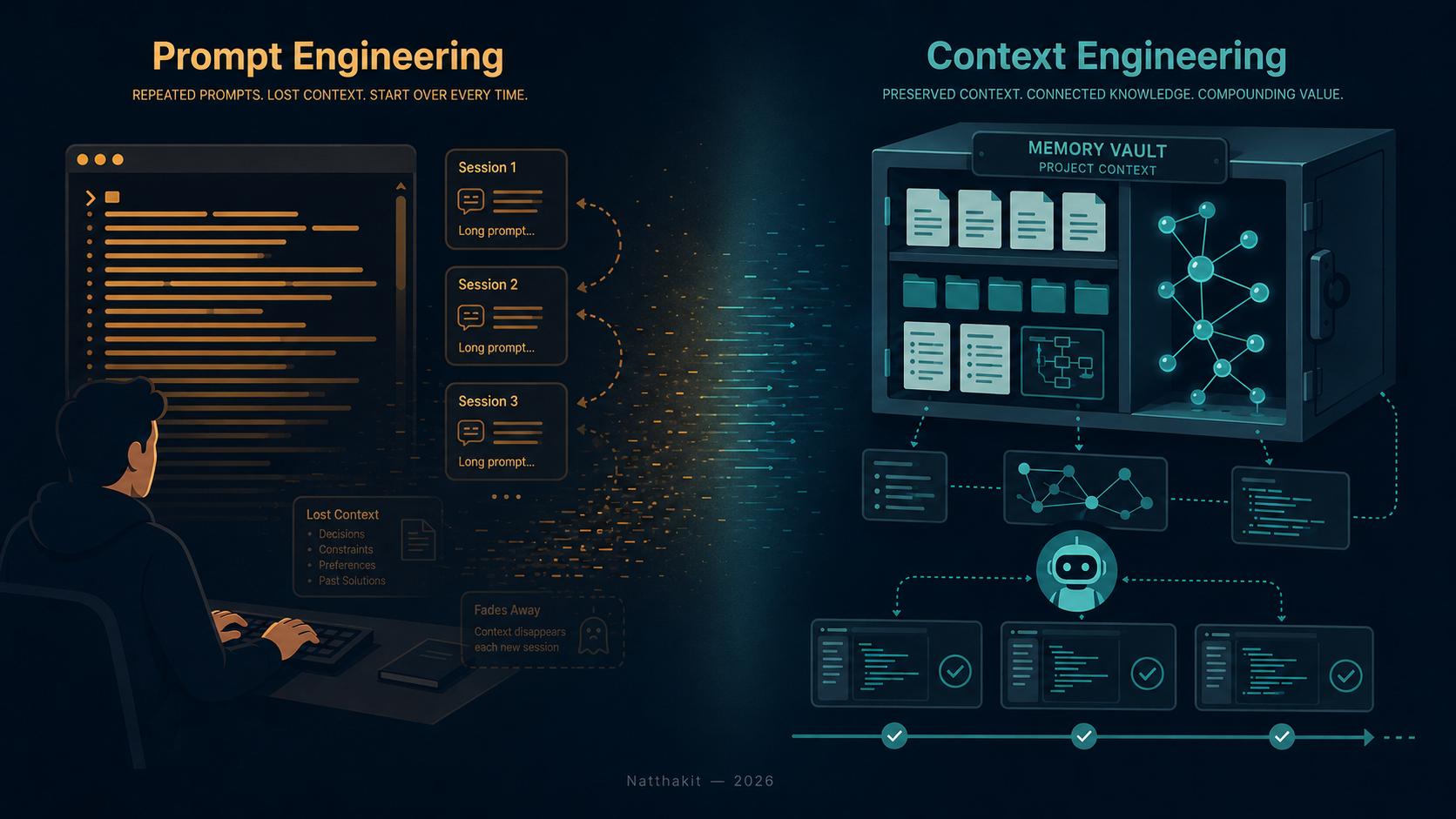
Prompt Engineering and Context Engineering workspace comparison
ภาพรวม: จากการทำงานระดับ code editor สู่การออกแบบ context system ระดับ architecture
วิธีอ่านบทความนี้: บทความนี้เป็น practical architecture guide สำหรับการออกแบบ project memory ให้ AI coding agent อ่าน ค้นหา และใช้ซ้ำได้ข้าม session โดยเนื้อหาอ้างอิงจาก Markdown ต้นฉบับแบบ faithful conversion

สารบัญ

Problem

1. ปัญหาจริงของ AI Coding ไม่ใช่แค่เขียนโค้ดผิด

AI coding agent เก่งขึ้นมากในช่วงสองสามปีที่ผ่านมา Claude Code, Codex, Cursor และ agent รุ่นใหม่ ๆ เขียนโค้ดได้เร็ว อ่าน stack trace ได้แม่น และ refactor ได้ในไม่กี่วินาที

แต่ถ้าคุณเคยใช้มันกับโปรเจกต์จริงที่มี codebase ใหญ่ คุณจะเจอปัญหาเดิมซ้ำ ๆ ทุกครั้งที่เปิด session ใหม่:

  • agent ไม่รู้ architecture decision ที่ทีมเคยตัดสินใจไปแล้ว
  • ต้องอธิบาย coding convention ใหม่ทุกครั้ง
  • ไม่รู้ว่า bug เดิมเคยแก้อย่างไร และทำไมถึงแก้แบบนั้น
  • ไม่รู้ว่า component ไหน reusable และ component ไหน deprecated
  • ไม่รู้ว่า API contract เปลี่ยนไปแล้ว หรือ runbook อยู่ที่ไหน
  • ไม่รู้ว่า workaround บางอย่างเป็น debt ชั่วคราว หรือเป็น design decision ที่ตั้งใจไว้

ปัญหานี้ไม่ใช่เรื่องของโมเดลที่ไม่เก่งพออย่างเดียว แต่เป็นเรื่องของ project memory ที่ขาดหาย

AI coding agent จำนวนมากทำงานเหมือน developer เก่งที่ถูกโยนเข้า codebase ใหม่ทุกเช้า มันอ่านไฟล์ได้เร็ว เข้าใจ pattern ได้ไว แต่ถ้าไม่มีระบบบอกว่า “ทีมนี้เคยคิดอะไร ตัดสินใจอะไร ห้ามทำอะไร และเคยพลาดอะไร” มันก็ยังต้องเดาจาก code ปัจจุบันอยู่ดี

ปัญหาของ AI Coding ในโปรเจกต์ใหญ่ไม่ใช่แค่มันเขียนโค้ดผิด แต่คือมันทำงานเหมือนคนเก่งที่เพิ่งเข้าทีมวันแรกทุกครั้ง

ไม่ว่าจะเขียน prompt ยาวแค่ไหน ถ้าไม่มีระบบที่เก็บและส่งต่อ context อย่างมีวินัย agent ก็ยังต้อง onboarding ใหม่ทุก session

สำหรับ developer จำนวนมาก ปัญหาไม่ได้อยู่ที่ AI เขียนโค้ดไม่เก่ง แต่คือ AI ไม่มีความทรงจำของโปรเจกต์ ทุกครั้งที่ต้องอธิบาย architecture ซ้ำ ย้ำ coding convention เดิม หรือเล่าประวัติของ bug เดิมอีกครั้ง คุณกำลังทำหน้าที่เป็น memory layer ให้ AI ด้วยตัวเอง

Context engineering คือการย้าย memory นั้นออกจากหัวคน ไปสู่ระบบที่ทั้งมนุษย์และ AI ใช้ร่วมกันได้อย่างต่อเนื่อง

Context

2. จาก Prompt Engineering สู่ Context Engineering

คนส่วนใหญ่พยายามแก้ปัญหานี้ด้วยการเขียน prompt ให้ยาวขึ้น ละเอียดขึ้น ใส่ background มากขึ้น ซึ่งช่วยได้บ้าง แต่ไม่ใช่คำตอบที่แท้จริง

Prompt engineering คือการเขียนคำสั่งให้ AI ตอบดีขึ้นในงานนั้น session นั้น มันเป็นทักษะที่สำคัญ แต่มันพึ่งความจำของคน ไม่ใช่ระบบ

Context engineering คือการออกแบบ environment ให้ AI ดึงความรู้ที่ถูกต้องมาใช้ซ้ำได้ข้าม session โดยอัตโนมัติ หรืออย่างน้อยก็ด้วย workflow ที่ชัดเจนซ้ำได้

ลองนึกภาพ task ง่าย ๆ: ให้ agent แก้ payment timeout ในระบบ production ถ้าเราใช้ prompt engineering อย่างเดียว เราอาจเขียน prompt ยาวมากว่า:

“ระบบนี้มี frontend retry, API gateway retry, service retry, payment-api ต่อ billing-service, ก่อนหน้านี้เคยมี incident เพราะ retry ซ้อนกัน ห้ามเพิ่ม retry ใหม่โดยไม่ดูทั้ง flow...”

ปัญหาคือ prompt นี้ต้องถูกเขียนซ้ำทุกครั้ง ถ้าคนลืมใส่หนึ่งประโยค agent อาจแก้ผิดทิศ เช่น เพิ่ม retry อีกชั้นเพื่อให้ request “ทนขึ้น” ทั้งที่ root cause จริงคือ retry ซ้อนกันมากเกินไป

นี่คือตัวอย่างของ prompt ที่ยาวขึ้น แต่ยังล้มเหลว เพราะมันพึ่งคนจำ context สำคัญให้ครบทุกครั้ง ไม่ได้พึ่งระบบความรู้ที่ agent กลับไปอ่านเองได้

ในทางกลับกัน ถ้า context engineering ถูกออกแบบไว้ดี agent จะเริ่มจากการอ่าน 00_Index, ไปต่อที่ debug lesson เก่า, ตรวจ architecture decision ที่เกี่ยวข้อง แล้วค่อยเสนอ change โดยอ้างอิง context ที่มีอยู่ ไม่ใช่เริ่มจากศูนย์

Prompt EngineeringContext Engineering
เน้นคำสั่งระบบความรู้
ขอบเขตsession เดียวต่อเนื่องข้าม session
พึ่งพาprompt ยาวquality ของ context
ความรับผิดชอบคนต้องอธิบายซ้ำAI อ่าน context เองได้
เหมาะกับtask สั้นproject จริง
วัดผลที่response ของ AIworkflow continuity

Prompt Engineering ทำให้ AI ตอบดีขึ้น
Context Engineering ทำให้ AI ดึงบริบทที่ถูกต้องมาใช้ได้
Memory Architecture ทำให้ AI ใช้ความรู้นั้นต่อเนื่องข้าม session

ข้อแตกต่างที่สำคัญที่สุดคือ context engineering ไม่ได้ทำให้ AI ตอบดีในวันนี้อย่างเดียว แต่ทำให้ AI ทำงานดีขึ้นทั้งโปรเจกต์

คำว่า context engineering ไม่ใช่คำใหม่ในวงการ AI engineering นักพัฒนาและทีมวิจัยหลายกลุ่มใช้คำนี้มาก่อนแล้ว เช่น Simon Willison ที่สรุป discussion จาก Tobi Lütke และ Andrej Karpathy รวมถึงทีม Anthropic ที่อธิบาย context engineering ในฐานะงาน curating information สำหรับ agent89 บทความนี้จึงไม่ได้พยายาม coin คำใหม่ แต่เสนอ practical architecture สำหรับนำแนวคิดนี้มาใช้กับ AI coding agent ในโปรเจกต์จริง

AI agent ที่ดีไม่ได้ต้องการ context เยอะที่สุด แต่ต้องการ context ที่ถูกต้องที่สุด ในเวลาที่เหมาะที่สุด

Memory Vault

3. Memory Vault คืออะไร

Memory Vault คือ external memory layer ที่เก็บความรู้ของโปรเจกต์ในรูปแบบที่ทั้งมนุษย์และ AI agent อ่าน เขียน ค้นหา และอ้างอิงซ้ำได้

สิ่งสำคัญที่ต้องเข้าใจให้ถูกต้อง:

ไม่ใช่ → AI มีความจำถาวรในตัวเอง
แต่คือ → AI มี external memory layer ที่กลับมาอ่านได้เมื่อ workflow อนุญาต

Memory Vault ทำงานเหมือน onboarding document ที่ไม่ได้มีไว้ให้คนอ่านอย่างเดียว แต่มีไว้ให้ AI agent อ่านด้วยทุกครั้งที่เริ่มทำงาน

ข้อมูลที่ควรเข้า vault คือบริบทที่คุณต้องอธิบายซ้ำหรือบริบทที่ถ้า agent เข้าใจผิดแล้วจะทำให้ตัดสินใจผิด เช่น project rules, API contracts, architecture decisions, debug lessons, reusable components, runbooks, known limitations, integration notes และ session logs รายละเอียดว่าจะจัดหมวดอะไรไว้ที่ไหนอยู่ใน Section 5 และ Section 6

Memory Vault ที่ดีไม่ใช่การเอาทุกอย่างโยนลง folder เดียว แล้วหวังว่า agent จะ “เข้าใจเอง” แต่มันต้องมีโครงสร้างที่ทำให้ agent รู้ว่าอะไรคือ source of truth, อะไรคือ raw note, อะไรคือ decision ที่ approved แล้ว และอะไรคือ context ที่ stale หรือ archived

Definitions

4. คำจำกัดความที่ต้องเข้าใจให้ตรงกัน

ก่อนเข้าสู่ architecture ใหญ่ ควรทำให้ศัพท์หลักชัดเจนก่อน เพราะหลายคำถูกใช้สลับกันจนความหมายพร่ามัว

คำความหมายที่แม่น
Markdown vaultPersistent memory substrate — ที่เก็บความรู้ระยะยาว
ObsidianHuman-facing knowledge frontend — หน้าจอให้มนุษย์อ่านและจัดการ
YAML / metadataIndexing and query layer — ทำให้ค้นหาและกรอง note ได้
MOCMap of Content — แผนที่นำทางแทนการ scan ทุกไฟล์
DataviewMetadata query layer — ดึง note ตาม condition
CLAUDE.mdOperating manual สำหรับ Claude Code
AGENTS.mdOperating manual สำหรับ Codex หรือ multi-agent repo
Claude CodeVault librarian + coding agent
LLM WikiArchitecture pattern สำหรับ AI-maintained knowledge system — รายละเอียดใน Section 8
HTMLPresentation layer — ไม่ใช่ memory layer

สรุปสั้น ๆ:

Markdown คือ memory, Obsidian คือ frontend, CLAUDE.md / AGENTS.md คือ operating manual และ HTML คือ presentation layer

Architecture

5. Architecture รวมที่ควรใช้

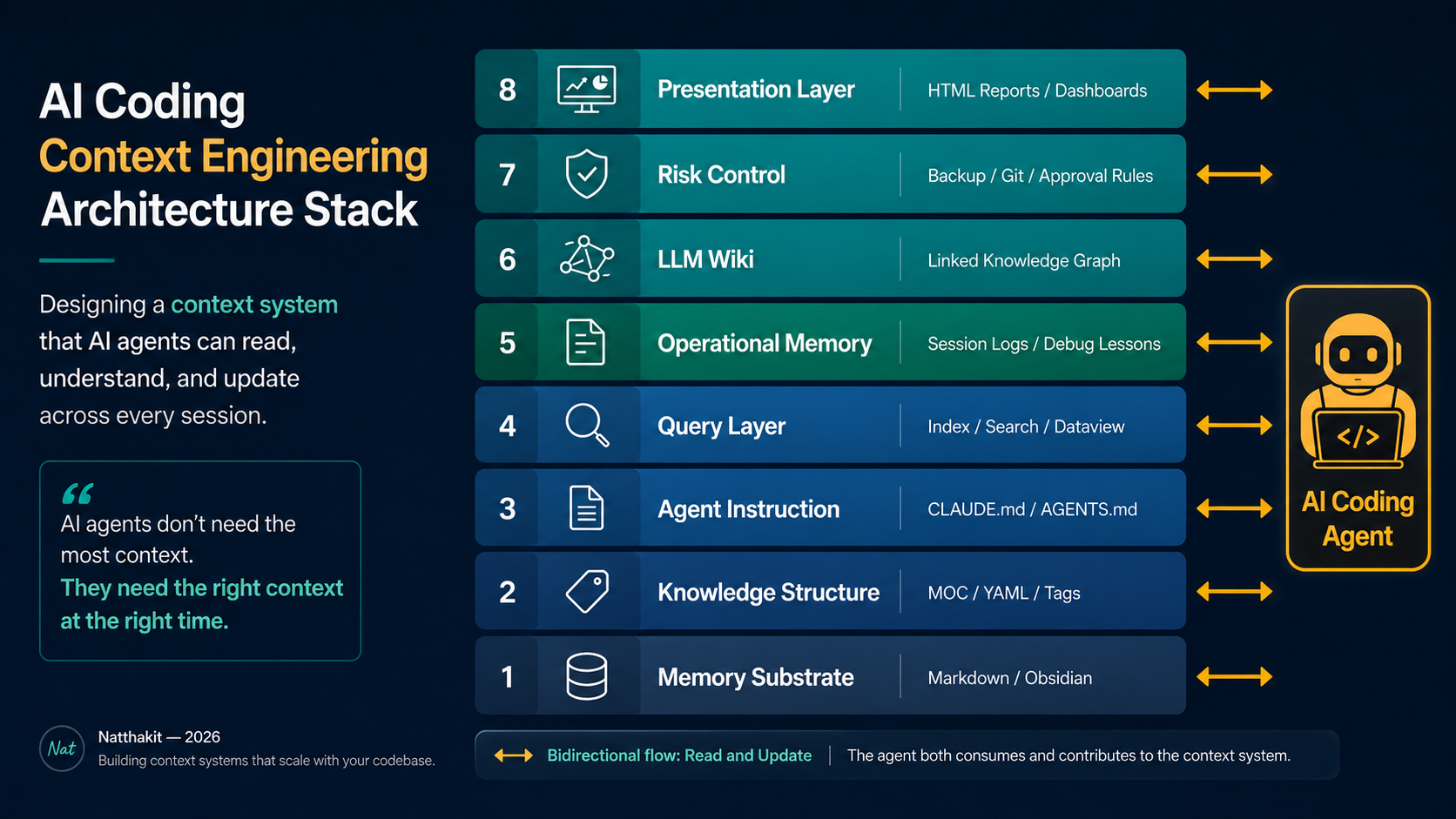
Memory Vault ที่ใช้งานได้จริงกับ AI Coding Agent ต้องมีครบทุก layer ต่อไปนี้:

Memory Vault architecture flow diagram
ภาพที่ 1: Memory Vault architecture แสดง 8 layer ตั้งแต่ memory substrate จนถึง presentation layer และความสัมพันธ์กับ AI coding agent
Layerเครื่องมือ / แนวคิดหน้าที่
Memory substrateMarkdown / Obsidianที่เก็บความรู้ระยะยาว
Knowledge structureMOC / YAML / tagsจัดระบบให้หาเจอและไม่ซ้ำ
Agent instructionCLAUDE.md / AGENTS.mdบอก agent ว่าต้องทำงานอย่างไร
Query layerDataview / index / MOCดึง context ที่เกี่ยวข้อง
Operational memorySession logs / debug lessonsบันทึกสิ่งที่เกิดระหว่างทำงาน
LLM Wiki layerLLM-maintained wiki patternทำให้ความรู้สะสมและเชื่อมโยงได้
Risk controlBackup / Git / approval rulesป้องกันข้อมูลพังหรือรั่ว
Presentation layerHTMLใช้ทำ report, dashboard, diagram

แต่ละ layer มีหน้าที่ต่างกัน และไม่ควรถูกปนกัน:

Memory substrate คือชั้นเก็บข้อมูลระยะยาว ถ้าชั้นนี้ไม่เป็น plain text หรือ version control ไม่ได้ การย้าย tool ในอนาคตจะยาก และ agent จะถูกผูกกับ platform มากเกินไป

Knowledge structure คือสิ่งที่ทำให้ note ไม่กลายเป็นกองเอกสาร MOC, YAML และ tags ช่วยให้ทั้งมนุษย์และ agent รู้ว่า note ไหนเกี่ยวกับอะไร สถานะเป็นอะไร และควรถูกอ่านในบริบทไหน

Agent instruction คือกติกาการทำงาน ไม่ใช่ knowledge base หลัก CLAUDE.md หรือ AGENTS.md ควรบอกวิธีทำงาน เช่น ก่อนแก้ต้องอ่านอะไร ห้ามลบอะไร ต้องถามเมื่อไหร่ และต้อง log ที่ไหน

Query layer คือกลไกดึง context ที่เกี่ยวข้องออกมา ไม่ใช่การ load ทั้ง vault เข้า prompt ทุกครั้ง เป้าหมายคือ agent ได้อ่านน้อยลง แต่แม่นขึ้น

Operational memory คือสิ่งที่เกิดขึ้นระหว่างการทำงานจริง เช่น session log, debug lesson, incident note และ follow-up item ชั้นนี้สำคัญมากเพราะมันเปลี่ยนประสบการณ์ที่เคยเกิดขึ้นให้กลายเป็น knowledge ที่ใช้ซ้ำได้

LLM Wiki layer คือ pattern ที่ทำให้ระบบนี้ไม่ใช่แค่ folder note แต่เป็น knowledge system ที่ agent ช่วย ingest, distill, link, query, lint และ maintain ได้ แนวคิดใน layer นี้ได้รับแรงบันดาลใจจาก gist ของ Andrej Karpathy เรื่อง LLM Wiki1 รายละเอียด workflow อยู่ใน Section 8

Risk control คือ guardrail ของระบบ ถ้าไม่มี backup, Git, approval rules และ no-secrets policy, Memory Vault จะกลายเป็นพื้นที่เสี่ยงเท่ากับ codebase ที่ไม่มี branch protection

Presentation layer คือชั้นแสดงผล HTML เหมาะกับ report, dashboard, diagram หรือ artifact ที่ต้องการ layout สวยและอ่านเร็ว แต่ไม่ควรใช้แทน Markdown ในฐานะ source of truth ระยะยาว

Markdown vs HTML — ต้องแยกหน้าที่ให้ชัด:

MarkdownHTML
ใช้สำหรับเก็บความรู้นำเสนอผลลัพธ์
เหมาะกับwiki, notes, docsdashboard, report, diagram
ข้อดีversion control ง่าย, agent maintain ง่ายvisual layout ดีกว่า, human consumption ดีกว่า

สิ่งที่เรากำลังออกแบบไม่ใช่ note app แต่คือ memory architecture สำหรับ AI agent

Vault Structure

6. โครงสร้าง Vault ที่แนะนำ

ใช้ AI-centric structure เป็น default เพราะสะท้อนงาน coding โดยตรงกว่า PARA และ agent อ่านแล้วรู้ทันทีว่าแต่ละ folder เก็บอะไร

00_Index/
01_Project_Rules/
02_API_Docs/
03_Reusable_Components/
04_Architecture_Decisions/
05_Agent_Session_Logs/
06_Debug_Lessons/
07_Runbooks/
08_People/
09_Attachments/
10_Archive/

CLAUDE.md
AGENTS.md
DESIGN.md
README.md
CHANGELOG.md
Note Timeline Hub.md
Folderใช้เก็บอะไร
00_IndexMOC, entry point, navigation map
01_Project_Rulescoding standard, naming, repo rules
02_API_Docsendpoint, contract, payload, auth
03_Reusable_Componentscomponent หรือ module ที่ใช้ซ้ำได้
04_Architecture_DecisionsADR, design decision, tradeoff rationale
05_Agent_Session_Logsสิ่งที่ AI ทำในแต่ละ session
06_Debug_Lessonsbug ที่เคยเจอและวิธีแก้
07_Runbooksdeploy, rollback, incident response
08_Peopleowner, stakeholder, domain contact
09_Attachmentsdiagram, image, exported files
10_Archiveของเก่าแต่ยังต้องอ้างอิง

Root files ควรมีหน้าที่แยกกันชัดเจน:

Fileหน้าที่
README.mdentry point ของ repo สำหรับมนุษย์และ AI
CLAUDE.mdoperating manual สำหรับ Claude Code
AGENTS.mdoperating manual สำหรับ Codex หรือ multi-agent workflow
DESIGN.mddesign-system, visual rules, component/style constraints
CHANGELOG.mdrelease-level change history ไม่ใช่ session log
Note Timeline Hub.mdtimeline ของ note และ context changes ใน vault

หมายเหตุ: โครง 00_Index/ ถึง 10_Archive/ คือ AI-readable memory layer ของโปรเจกต์ ไม่ใช่ replacement ของ codebase structure ทั้งหมด ถ้า repo มี code จริง ให้เพิ่ม src/, tests/, scripts/, infra/ และ docs/ ในระดับ root เดียวกัน โดยแยกหน้าที่ให้ชัดว่า code อยู่ใน code folders ส่วน context, decision, session log และ runbook อยู่ใน memory layer

ตัวอย่าง repo ที่มี code จริง:

src/
tests/
scripts/
infra/
docs/

00_Index/
01_Project_Rules/
02_API_Docs/
03_Reusable_Components/
04_Architecture_Decisions/
05_Agent_Session_Logs/
06_Debug_Lessons/
07_Runbooks/
08_People/
09_Attachments/
10_Archive/

CLAUDE.md
AGENTS.md
DESIGN.md
README.md
CHANGELOG.md
Note Timeline Hub.md

docs/ ควรใช้กับเอกสารที่ publish หรือ serve ต่อ เช่น user docs, API reference หรือ static site ส่วน 00_Index/ ถึง 10_Archive/ ใช้เป็น internal project memory สำหรับ decision, rule, session context และ runbook

ถ้าคุณใช้ Obsidian กับ PARA อยู่แล้ว สามารถ map โครงนี้เข้ากับ Projects / Areas / Resources / Archive ได้ แต่สำหรับ AI Coding Agent แนะนำให้เริ่มจากโครงสร้างที่สะท้อนงาน coding โดยตรงก่อน

Structure ที่ดีไม่ใช่ทำให้ vault ดูสวย แต่ทำให้ agent ดึง context ได้ถูกที่โดยไม่ต้อง scan ทุกอย่าง

Agent Rules

7. กฎที่ควรเขียนใน CLAUDE.md

CLAUDE.md ไม่ใช่สมองของ vault มันคือ operating manual ที่บอก Claude Code ว่า vault นี้จัดอย่างไร อะไรทำได้เอง อะไรต้องถามก่อน และแก้แล้วต้อง update ที่ไหน

Claude Code รองรับการใช้ CLAUDE.md เป็น persistent instruction สำหรับ project context และมี auto memory สำหรับเรียนรู้บางอย่างจากการทำงาน แต่เอกสารของ Claude Code ก็ชี้ชัดว่าแต่ละ session เริ่มด้วย fresh context window ดังนั้น instruction file จึงเป็นกลไกสำคัญในการส่งต่อบริบทข้าม session2

ในฝั่ง Codex แนวคิดเดียวกันคือ AGENTS.md ซึ่ง OpenAI ระบุเป็นไฟล์ custom instructions สำหรับบอก project norms และ guidance ให้ Codex ใช้ก่อนเสนอหรือแก้งาน3

ตัวอย่าง CLAUDE.md ที่ใช้งานได้จริง:

# Vault Operating Rules

## Core Principles

1. Do not delete content unless explicitly approved.
2. Do not bulk rename, move, or delete files without asking first.
3. Read the relevant MOC or index before editing notes.
4. Every note must include YAML metadata.
5. Keep tags meaningful and limited.
6. Every note must have a clear purpose.
7. Log every created or modified note into `Note Timeline Hub.md`.
8. Do not overwrite original text without permission.
9. Separate raw notes from refined wiki notes.
10. Do not store secrets, credentials, or customer-sensitive data in AI-readable notes.

## Before Editing

- Read `00_Index` first.
- Search for existing related notes before creating a new note.
- Ask before performing bulk operations affecting 10 or more files.
- Preserve original wording unless the task explicitly asks for rewriting.

## After Editing

- Update backlinks where relevant.
- Add or update YAML metadata.
- Log the change in `Note Timeline Hub.md`.
- Suggest follow-up cleanup if duplicate or stale notes are detected.

ถ้าไม่มี CLAUDE.md agent จะเดา house rule เอง แต่ถ้ามี CLAUDE.md ที่ดี agent จะทำงานเหมือนรู้กติกาของทีมตั้งแต่วันแรก

LLM Wiki

8. LLM Wiki: จากกองโน้ตสู่ระบบความรู้

Memory Vault ที่ดีไม่ใช่แค่เก็บ note เยอะ แต่ต้องเปลี่ยน raw experience ให้กลายเป็น reusable project knowledge ผ่าน workflow ที่มีวินัย

Workflowหน้าที่
Ingestเอา raw notes, issue, meeting, PR, incident เข้าระบบ
Distillให้ AI สรุปเป็น wiki note ที่อ่านง่าย
Linkเชื่อม note ที่เกี่ยวข้อง
Queryให้ agent อ่านเฉพาะ context ที่เกี่ยวข้อง
Lintตรวจ note ซ้ำ, orphan note, decision ที่ขัดกัน
Logบันทึกว่า agent ทำอะไรกับ vault

แนวคิด LLM Wiki layer ในบทความนี้ได้รับแรงบันดาลใจจาก gist ของ Andrej Karpathy เรื่องการใช้ LLM ช่วยดูแล persistent wiki แต่ workflow 6 ขั้นต่อไปนี้เป็น operational design ที่ผมจัดโครงขึ้นเพื่อใช้กับ AI coding agent และทีมพัฒนาโดยเฉพาะ ไม่ใช่ specification ตายตัวของ Karpathy คุณควรใช้เป็น starting point แล้วปรับตาม workflow, risk profile และ tooling ของทีม

ตัวอย่าง End-to-End Workflow

สมมติทีมเจอ incident: checkout ช้าและ payment timeout ระหว่าง traffic สูง

1. Ingest
เอาข้อมูลดิบเข้ามาก่อน เช่น Slack thread, incident note, PR description, log excerpt และคำอธิบายจาก developer ที่แก้ปัญหาในวันนั้น ข้อมูลพวกนี้ยังไม่ต้องเรียบร้อย แต่ต้องไม่หาย

2. Distill
ให้ agent สกัดเป็น wiki note ที่มี structure เดียวกันทุกครั้ง เช่น Problem, Root Cause, Decision, Future Rule, Related Notes และ Status จุดนี้คือการเปลี่ยน raw memory ให้เป็น project knowledge

3. Link
เชื่อม note ใหม่เข้ากับ API Gateway Timeout Policy, Billing Service, Payment API, Retry Policy และ architecture decision ที่เกี่ยวข้อง การ link ไม่ใช่แค่เพื่อ graph สวย แต่เพื่อให้ session ถัดไปอ่านบริบทต่อเนื่องได้

4. Query
ครั้งต่อไปที่ agent ถูกสั่งให้แก้ payment timeout มันไม่ควรอ่านทั้ง vault แต่ควรเริ่มจาก MOC แล้ว query เฉพาะ note ที่เกี่ยวกับ payment, timeout, retry และ billing-service

5. Lint
ให้ agent ตรวจว่า note ใหม่ซ้ำกับ note เก่าหรือไม่ มี decision ไหนขัดกันหรือไม่ มี note ไหนไม่มี backlink หรือไม่มี status หรือไม่

6. Log
ทุกการสร้างหรือแก้ note ต้องลง session log เพื่อให้ทีมย้อนดูได้ว่า agent ทำอะไร ใช้ context อะไร และมี follow-up อะไรเหลืออยู่

ตัวอย่าง: จาก Debug Log เป็น Wiki Note

Raw note จากการแก้ปัญหา:

2026-05-20
Payment API timeout ตอนเรียก billing-service
สาเหตุคือ retry 3 ชั้น: frontend retry, API gateway retry, service retry
แก้โดยปิด retry ที่ frontend และย้าย timeout control ไปที่ gateway

Distilled wiki note ที่ agent อ่านซ้ำได้:

---
title: Payment API Timeout Caused by Layered Retry
type: debug-lesson
component: payment-api
status: resolved
tags: [payment, timeout, retry]
related: [[API Gateway Timeout Policy]], [[Billing Service]]
---

## Problem
Payment API เกิด timeout เมื่อเรียก billing-service

## Root Cause
มี retry ซ้อนกัน 3 ชั้น: frontend retry, API gateway retry, service retry

## Decision
ปิด retry ที่ frontend และให้ gateway เป็นจุดควบคุม timeout หลัก

## Future Rule
ห้ามเพิ่ม retry layer ใหม่โดยไม่ตรวจ retry policy ทั้ง flow ก่อน

ตัวอย่าง: Session Log ที่ดี

---
date: 2026-05-20
agent: Claude Code
type: session-log
scope: payment-api
tags: [session-log, payment-api]
---

## Task
Refactor payment timeout handling

## Files touched
- payment-api/src/client/billing.ts
- docs/04_Architecture_Decisions/API Gateway Timeout Policy.md

## Context used
- [[Payment API Timeout Caused by Layered Retry]]
- [[Billing Service]]
- [[API Gateway Timeout Policy]]

## Changes made
- Removed frontend retry
- Centralized timeout handling at gateway
- Updated debug lesson note

## Follow-up
Review retry behavior in refund flow

ความแตกต่างระหว่าง raw note กับ distilled wiki note อยู่ที่ structure ที่ agent อ่านแล้วได้ context ครบในครั้งเดียว ไม่ต้อง infer จาก free text

Obsidian ช่วยตรงนี้ได้เพราะ vault คือ folder ของ Markdown plain text ที่แก้ด้วย editor หรือ file manager อื่นได้4 ส่วน Properties/YAML ทำหน้าที่เป็น structured metadata ให้ note ค้นหา กรอง และใช้กับ plugin ต่อได้5 Dataview ก็ทำงานบน metadata ใน Markdown เช่น YAML frontmatter และ inline fields ไม่ใช่การอ่านทุกอย่างใน vault แบบวิเศษ6

LLM Wiki ไม่ใช่การเก็บ note ให้เยอะขึ้น แต่คือการทำให้ raw experience กลายเป็น reusable project knowledge
Governance

9. Risk Control: อย่าให้ Memory Vault กลายเป็นสุสานโน้ต

Memory Vault ที่ไม่มี governance จะเสื่อมเร็วมาก note ซ้ำ tag เยอะจน query ไม่ได้ decision ขัดกัน และ agent อ่านผิด note นำไปสู่โค้ดผิด

Riskวิธีควบคุม
Note ซ้ำใช้ MOC + search ก่อนสร้าง
Tag เยอะเกินจำกัด tag และนิยาม tag ให้ชัด
Context rotดึงเฉพาะ note ที่เกี่ยวข้อง ไม่ load ทั้ง vault
AI ลบหรือย้ายไฟล์ผิดตั้ง approval rule ใน CLAUDE.md
ข้อมูล sensitive หลุดห้ามบันทึก secrets, credentials, API keys, tokens, customer data หรือ PII ลงใน AI-readable vault; ระบุ rule นี้ใน CLAUDE.md / AGENTS.md และใช้ .gitignore กันไฟล์เสี่ยง
Vault พังจาก bulk operationใช้ Git + backup ก่อนทุก session
Knowledge stale / state driftใช้ status, owner, review date และ archive rule; ห้ามให้ agent override architecture decision ที่ approved แล้วโดยไม่มี human review
Instruction ยาวเกินไปทำ CLAUDE.md ให้สั้น ชัด และมี priority
Agent อ่านผิด noteใช้ index/MOC และ naming convention ที่คาดเดาได้
Multi-author driftกำหนด owner ต่อ folder และใช้ review process สำหรับ note สำคัญ
Agent กับมนุษย์เขียนทับกันให้ agent log diff ทุกครั้ง และ require approval หรือ Pull Request สำหรับ note ที่ status: approved หรือส่งผลต่อ architecture decision

Memory Vault ต้องถูกดูแลเหมือน codebase เพราะมันเริ่มกลายเป็น input ที่มีผลต่อการตัดสินใจของ agent ถ้า codebase มี lint, review, branch protection และ rollback แต่ knowledge base ไม่มีอะไรเลย agent ก็อาจอ้างอิงข้อมูลผิดเท่ากับ compile ผ่านแต่ design ผิด

Governance ที่ดีไม่ได้ทำให้ workflow ช้าลงเสมอไป ตรงกันข้าม มันลดเวลาแก้ปัญหาซ้ำ เพราะทุกคนรู้ว่า source of truth อยู่ไหน note ไหน approved แล้ว note ไหนเป็น raw draft และการเปลี่ยนแปลงใดต้องขอ approval ก่อน

Cloudflare เขียนถึงปัญหา agent memory และ context rot ไว้ชัดเจนว่า context window ใหญ่ขึ้นไม่ได้แก้ทุกอย่าง เพราะคุณภาพผลลัพธ์ผูกกับคุณภาพของ context และการใส่ทุกอย่างเข้า context อาจทำให้คุณภาพเสื่อมลงได้7 นี่คือเหตุผลที่ Memory Vault ต้องไม่ใช่ “เก็บให้เยอะที่สุด” แต่ต้องเป็นระบบที่ดึง context ที่ถูกต้องมาใช้ในเวลาที่ถูกต้อง

Memory Vault ที่ดีต้องมี governance ไม่ต่างจาก codebase หรือ infrastructure

ถ้าคุณคิดว่าการตั้งกฎใน CLAUDE.md มากเกินไป ให้ถามตัวเองว่า: ถ้า junior dev เข้ามาทีมวันนี้โดยไม่มี onboarding เลย คุณจะยอมให้เขา bulk delete ไฟล์ตามดุลยพินิจตัวเองได้ไหม?

Getting Started

10. วิธีเริ่มต้นแบบไม่ Over-engineer

อย่าสร้าง vault ใหญ่ตั้งแต่วันแรก ให้เริ่มจากโครงสร้างเล็กที่ใช้งานได้จริงก่อน:

00_Index/
01_Project_Rules/
02_API_Docs/
03_Architecture_Decisions/
04_Debug_Lessons/
05_Agent_Session_Logs/

CLAUDE.md
AGENTS.md
README.md
CHANGELOG.md
Note Timeline Hub.md

ขั้นตอน 7 ข้อ:

  1. สร้าง vault สำหรับโปรเจกต์เดียวก่อน
  2. เปิด Git หรือ backup ก่อนทำอะไรทั้งนั้น
  3. สร้าง 00_Index เป็น entry point
  4. เขียน CLAUDE.md หรือ AGENTS.md ให้ชัดเจน
  5. ให้ agent อ่าน index ก่อนทำงานทุกครั้ง
  6. ให้ agent log ทุก session ลงใน 05_Agent_Session_Logs
  7. เพิ่ม folder ใหม่เมื่อ workflow เริ่มซับซ้อนจริง ไม่ใช่ล่วงหน้า

ถ้า repo นี้มี frontend, dashboard, diagram หรือ design-system ที่ agent ต้องแก้ ให้เพิ่ม DESIGN.md ตั้งแต่ต้น แต่ถ้าเป็น backend หรือ infra repo ที่ยังไม่มี visual layer ชัดเจน จะเพิ่ม DESIGN.md ภายหลังก็ได้

สิ่งที่ควรเริ่มเก็บก่อน:

  • Context ที่ต้องอธิบายซ้ำบ่อยที่สุดในตอนนี้
  • Architecture decision สำคัญที่เคยใช้เวลาตัดสินใจนาน
  • Bug ที่เคยเสียเวลาแก้นานกว่าที่ควร
  • Coding convention ที่ agent มักทำผิดซ้ำ
  • Runbook หรือ deployment/rollback steps ที่ถ้า agent ทำผิดแล้วกระทบ production
  • API contract ที่เปลี่ยนยากและ downstream เยอะ

อย่าเริ่มจากการสร้าง taxonomy ที่สมบูรณ์แบบ ให้เริ่มจาก pain ที่เกิดซ้ำจริง ถ้าคุณต้องบอก agent ทุกครั้งว่า “อย่าใช้ library ตัวนี้”, “API นี้เปลี่ยนแล้ว”, “component นี้ deprecated แล้ว”, “bug นี้เคยเกิดจาก timezone” นั่นแหละคือ note แรก ๆ ที่ควรเข้า vault

อย่าเริ่มจาก vault ใหญ่ ให้เริ่มจาก context ที่คุณต้องอธิบายซ้ำบ่อยที่สุด

Conclusion

11. บทสรุป

อนาคตของ AI Coding ไม่ได้อยู่ที่ใครมี prompt ยาวกว่า แต่อยู่ที่ใครออกแบบ context system ได้ดีกว่า

AI agent ที่มี Memory Vault ที่ดีจะไม่ใช่แค่ตอบเร็วขึ้น แต่จะทำงานเหมือนเข้าใจ DNA ของโปรเจกต์มากขึ้นเรื่อย ๆ เพราะมันมี memory layer ที่อ่านได้ ใช้ซ้ำได้ และดูแลต่อได้

สิ่งที่เราทำในบทความนี้ไม่ใช่การใช้ Obsidian ให้เก่งขึ้น ไม่ใช่การเขียน prompt ให้ดีขึ้น แต่คือการออกแบบระบบที่ทำให้ AI agent ทำงานต่อเนื่องข้าม session ได้อย่างมีวินัย

Prompt engineering ทำให้ AI ตอบดีใน session นี้
Context engineering ทำให้ AI ทำงานดีขึ้นทั้งโปรเจกต์

AI Coding Agent จะเก่งขึ้นจริงเมื่อเราเลิกหวังให้มันจำทุกอย่างเอง แล้วเริ่มออกแบบระบบให้มันอ่าน context ที่ถูกต้องได้เองอย่างมีวินัย

นี่คือการเปลี่ยนจาก prompt engineering ไปสู่ context engineering

References

References

  1. Andrej Karpathy, llm-wiki — gist describing an LLM-maintained persistent wiki built from structured, interlinked Markdown. https://gist.github.com/karpathy/442a6bf555914893e9891c11519de94f ↩
  2. Anthropic, How Claude remembers your project — Claude Code Docs. https://code.claude.com/docs/en/memory ↩
  3. OpenAI Developers, Custom instructions with AGENTS.md — Codex. https://developers.openai.com/codex/guides/agents-md ↩
  4. Obsidian Help, How Obsidian stores data. https://obsidian.md/help/data-storage ↩
  5. Obsidian Help, Properties. https://obsidian.md/help/properties ↩
  6. Dataview Documentation, Adding Metadata and Dataview overview. https://blacksmithgu.github.io/obsidian-dataview/annotation/add-metadata/ and https://blacksmithgu.github.io/obsidian-dataview/ ↩
  7. Cloudflare Blog, Agents that remember: introducing Agent Memory. https://blog.cloudflare.com/introducing-agent-memory/ ↩
  8. Simon Willison, Context engineering — discussion of context engineering as a broader framing than prompt engineering, citing Tobi Lütke and Andrej Karpathy. https://simonwillison.net/2025/Jun/27/context-engineering/ ↩
  9. Anthropic Engineering, Effective context engineering for AI agents — context engineering as the practice of curating information available to agents. https://www.anthropic.com/engineering/effective-context-engineering-for-ai-agents ↩